Showing posts with label Membership. Show all posts

Saturday, 21 June 2014

Club Penguin Penguin Cup 2014 Cheats

The Penguin Cup is On! Here are the Club Penguin Penguin Cup 2014 Cheats...
Hello penguins! As many of you know, the Penguin Cup is now here in Club Penguin, which means that it's time for me to post the latest cheats for the Penguin Cup in Club Penguin. Below, I will post cheats on how you can participate in the Penguin Cup for your team and how you can earn some items doing so...

Club Penguin Penguin Cup 2014 Cheats
Firstly when you log into Club Penguin, you should see Aunt Arctic who is talking to you. Let's have a look at what Aunt Arctic has to say to you...

Club Penguin Penguin Cup 2014 Cheats
The Penguin Cup is on! Pick a team and challenge other players. Every goal you score brings your team closer to the trophy!
...after you have listened to what Aunt Arctic has to say, click on the "OK" button to continue. Once you have done this, the football icon should move into the top-right corner with the moderator badge icon...

Club Penguin Penguin Cup 2014 Cheats

...once it has done this, click on it and this will appear on your screen...

Club Penguin Penguin Cup 2014 Cheats

...to choose a team, all you have to do is click on the penguin representing the team. For example, as I would like to support and represent the Sharks team, I'll click on the blue penguin. Once you have done this, this will appear on your screen depending on the team which you picked...

Club Penguin Penguin Cup 2014 Cheats

...in the top-right, we can see the score board for each team with the amount of points which they have got. At the bottom, we can see the different items which you can earn from scoring points during the Penguin Cup. To receive the Penguin Cup Ball, click on the "Collect" button which can be found at the top. Once you have done this, it's time to make your way to the Island Stadium at the Snow Forts...

Club Penguin Penguin Cup 2014 Cheats

...once you enter the Island Stadium, click on the "D" button on your keyboard and this will appear above your penguin's head...

Club Penguin Penguin Cup 2014 Cheats

...once another penguin has clicked on the icon above your head, it will be time to shootout and score points for your team...

Club Penguin Penguin Cup 2014 Cheats

...in a shootout, you''ll be given a certain amount of time to score as many goals as you can. To score a goal, you will have to press the space bar when the circle is on top of the target symbol. If you do this correctly, your penguin will score a goal. Once shootout time is up, this'll appear on your screen...

Club Penguin Penguin Cup 2014 Cheats

...here we can see the statistics of my scoring during the shootout like the amount of goals which I have scored and my score streak. These statistics will then add up to a certain amount of coins which you'll earn. Under the statistics, we can see a earning bar, which tells me how much points I'll have to get to earn items for the Penguin Cup. Once you have got enough points, the items will be unlocked for you to earn. There's one item for non-members as well as the item for members!

My View
I love that the Penguin Cup is finally in Club Penguin as I couldn't wait any longer to represent my team and score some points for them. I like how you can earn coins and items for scoring goals, I also like how Club Penguin have allowed non-members to get some items as well! 

Your Say
Now it's time for your say! What do you think of the Penguin Cup in Club Penguin? What team are you representing for the Penguin Cup? What items which you can earn for scoring goals are you favourite? Select your reaction of this post below and share us your thoughts of this post by leaving a comment below.
~Boba 126

Friday, 9 May 2014

Club Penguin Future Party Login Screen

Club Penguin releases a login screen to promote the upcoming Future Party in Club Penguin...
Hello penguins! Recently when Club Penguin updated, a special login screen was released to promote the upcoming Future Party which is coming to Club Penguin later this month. In this post, I'll be going over what the login screen contains and what it tells us about the upcoming Future Party. Firstly, let's take a look at the Future Party login screen...

Club Penguin Future Party Login Screen

Club Penguin Future Party Login Screen
...in the login screen above, we can see 3 different robos which are being piloted by penguins in the future. From left to right, one robo has hot sauce bottles connected to it, another has Fluffy the Fish connected to it and another one looks like a puffle. We can also see a green penguin in the top-right corner using a jet pack. The two nearest robos are firing at what seems to be a large upgraded Protobot, this gives us a hint that we may be battling with Protobot as party of the Future Party. To the left of this login screen we can see the tag line for the Future Party which is "Save The Island", which tells us that the island will be in some danger during the Future Party, presumably Protobot. Below the tagline, we can see the logo for the Future Party which looks great! Under the logo, we can also see the date of the Future Party - "May 22 and June 3" which tells us when then Future Party will begin (May 22nd) and when it will end (June 3rd).
My View
I love the great design of this login screen as it gives me a great idea of what the Future Party will be about, battling Protobot to save the island! I also like the look of the robos which will probably be a feature during the Future Party, which I can't wait to steer and control. 

Your Say
Now it's time for your say! What do you think of the Future Party Login Screen above? Are you excited for the upcoming Future Party? Select your reaction of this post below and share us your thoughts by leaving a comment below.
~Boba 126

Friday, 2 May 2014

Club Penguin Funny Hat Week is Here!

The Funny Hat Week is now at The Dock in Club Penguin...
Hello penguins! Some have you may notice when you waddle to The Dock this week, that there's a special event on! This special event is called "Funny Hat Week" and is designed to celebrate all of the funny hats in Club Penguin. However, this event is only being celebrated for a week at the Dock, so let's check it out...

Club Penguin Funny Hat Week is Here!
The Funny Hat Week in Club Penguin is being celebrated at The Dock only, for one week, so let's take a look at how The Dock is decorated for the Funny Hat Week event...

Club Penguin Funny Hat Week is Here!

...the Funny Hat Week is only just decorations, all penguins can receive 5 funny hats to wear during the event. To receive them, all you have to do is click on them and click on the "Yes" button...

Club Penguin Funny Hat Week is Here!

...as well as the 5 funny hats, all penguins can collect a free background for Funny Hat Week.  To receive it, all you have to do is click on the camera and don't forget to stick your tongue out...

Club Penguin Funny Hat Week is Here!

...after the camera has taken the picture, a blue popup box will appear on your screen which looks like this...

Club Penguin Funny Hat Week is Here!

...click on the "Yes" button to receive the Funny Hat Week Background which is available for all penguins. Finally, I'd like to talk about a fun feature at the Funny Hat Week which you should do before the event ends...

Club Penguin Funny Hat Week is Here!

...at the top of The Dock, penguins can find a podium which they can top if they're wearing a suitable hat for the category. For example, for the "Tastiest Hat" category you could wear hats like the Salami Sun Hat or the "Ice Cream Hat...

My View
I like that Club Penguin are creating small parties like Funny Hat Week as it allows penguins to have some more fun! I also like how that there are a total of 6 different free items which all penguins can collect during this event as well!

Your Say
Now it's time for your say! What do you think of Funny Hat Week? What is your favourite free item from Funny Hat Week? Select your reaction of this post below and share us your thoughts by leaving a comment below.
~Boba 126

Thursday, 17 April 2014

Club Penguin - Puffle Party 2014 Guide

The Puffle Party 2014 is now in Club Penguin! Take a look at my guide of the Puffle Party 2014...
Hello penguins! As many if you know, the Puffle Party 2014 is now in Club Penguin. For the Puffle Party 2014, I have created a special guide which is designed to help you complete everything at the Puffle Party 2014 before it ends. This includes things like adopting the Dog Puffle and Cat Puffle, as well as earning special puffle-tastic free items! Let's get started with my guide of the Puffle Party 2014 in Club Penguin...

Club Penguin - Puffle Party 2014 Guide

Unlocking Free Puffle Party Items
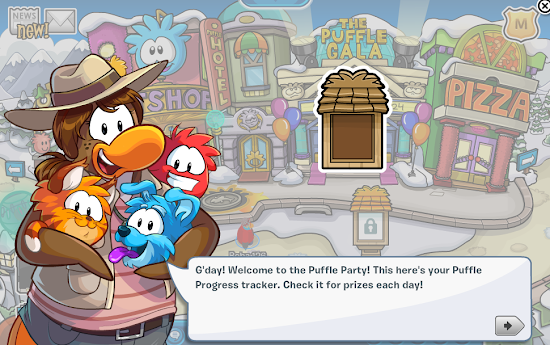
When you log into Club Penguin for the Puffle Party, Club Penguin's Puffle Expert, the Puffle Handler will start to talk to you about the Puffle Party 2014 in Club Penguin. This is what PH will say to you...

Club Penguin - Puffle Party 2014 Guide
G'day! Welcome to the Puffle Party! This here's your Puffle Progress tracker. Check it for prizes each day!
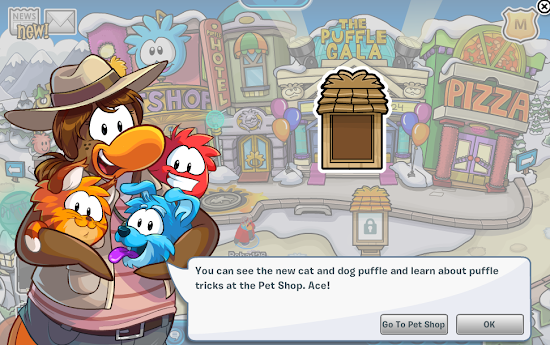
...click on the arrow button to hear more about what PH has to say...

Club Penguin - Puffle Party 2014 Guide
You can see the new cat and dog puffle and learn about puffle tricks at the Pet Shop. Ace!
...click on the "OK" button for now...

Collecting Free Puffle Party Items
In this part of the post, you'll find out how you can collect free items especially for the Puffle Party everyday. So let's get started, click on the Puffle Progress Tracker icon in the top-right corner of your screen next to the moderator badge like this...

Club Penguin - Puffle Party 2014 Guide

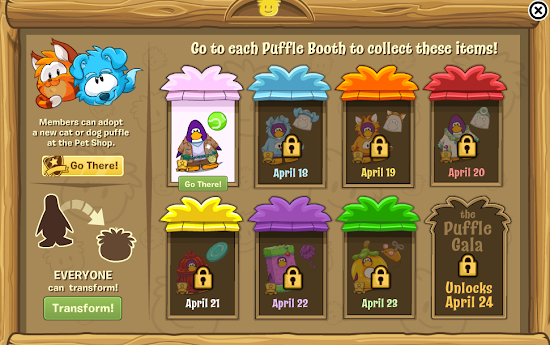
...if you have done this correctly, this should appear on your screen...

Club Penguin - Puffle Party 2014 Guide

...here we can see the different free items which penguins can unlock and at the moment, only one is unlocked. Click on the "Go There!" button which looks like this to go to the Pink Puffle Booth...

Club Penguin - Puffle Party 2014 Guide

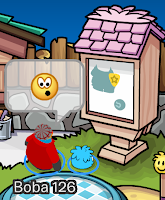
...if you have done this correctly, you should now be in the Stadium. Once you're in the Stadium, click on the Pink Puffle Booth which looks like this...

Club Penguin - Puffle Party 2014 Guide

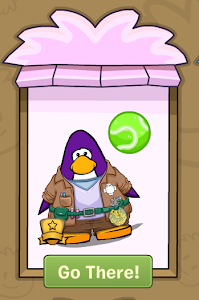
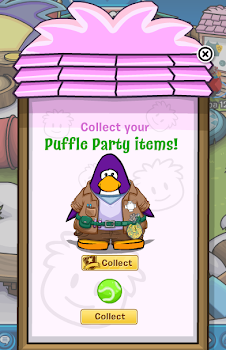
...if you click on it, the Pink Puffle Booth should appear on your screen, which looks like this...

Club Penguin - Puffle Party 2014 Guide

...click on the "Collect" buttons to receive the Puffle Trainer Outfit item for members and the Squeaky Ball for everyone...

Teaching your Puffles New Tricks
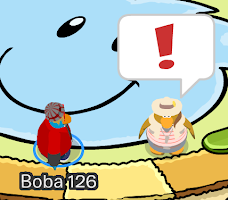
In this part of the post, you'll find out how you can teach your pet puffle to do some awesome tricks! Let's get started, make your way to the Pet Shop in Club Penguin and click on PH who should have an exclamation mark above her head like this...

Club Penguin - Puffle Party 2014 Guide

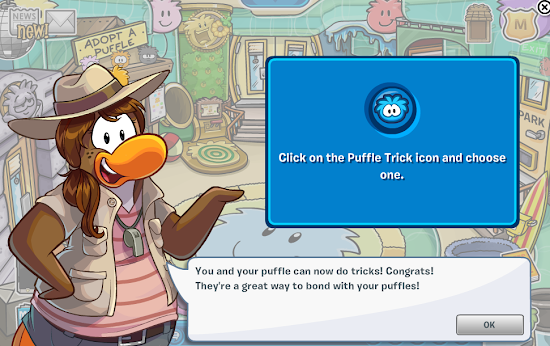
...if you have done this correctly, PH will start to talk to you about Puffle Tricks...

Club Penguin - Puffle Party 2014 Guide
You and your puffle can now do tricks! Congrats! They're a great way to bond with your puffles!
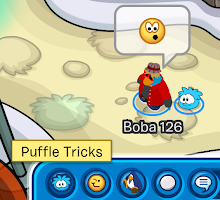
...click on the "OK" button to continue with your learning of Puffle Tricks. Next, take a look at the chatbar on the bottom of your screen. On the left of the chatbar, you can see the Puffle Trick which looks like this...

Club Penguin - Puffle Party 2014 Guide

...and if you click on it, you'll be able to see the 7 different puffle tricks...

Club Penguin - Puffle Party 2014 Guide

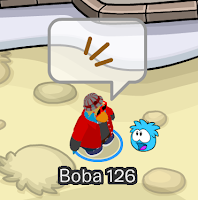
...next, I'll show you what each trick looks like, even the puffle super trick. Firstly here's the nuzzle puffle trick...

Club Penguin - Puffle Party 2014 Guide

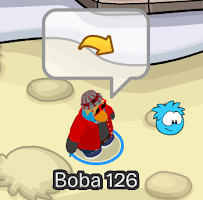
...the speak puffle trick...

Club Penguin - Puffle Party 2014 Guide

...the jump puffle trick...

Club Penguin - Puffle Party 2014 Guide

...the stand on head puffle trick...

Club Penguin - Puffle Party 2014 Guide

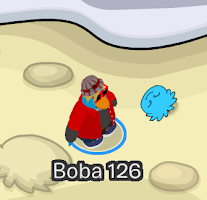
...the roll puffle trick...

Club Penguin - Puffle Party 2014 Guide

...the spin puffle trick...

Club Penguin - Puffle Party 2014 Guide

...and lastly, the instant dig puffle trick...

Club Penguin - Puffle Party 2014 Guide

Transforming into your Puffles
In this part of the post, I'll be teaching you how you can transform into your pet puffles! Let's get started by clicking on the Puffle Progress Tracker icon in the top-right corner which is next to the moderator badge...

Club Penguin - Puffle Party 2014 Guide

...once you've opened up your Puffle Progress Tracker, click on the "Transform!" button which looks like this...

Club Penguin - Puffle Party 2014 Guide

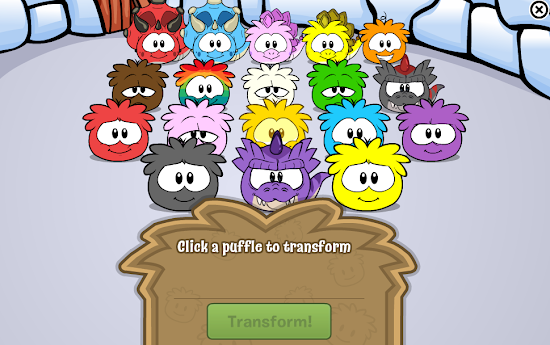
...if you click on this button, this will appear on your screen...

Club Penguin - Puffle Party 2014 Guide

...click on on of your pet puffles and then click on the "Transform!" button, if you have done this correctly, you should be transformed into the puffle of your choice...

Club Penguin - Puffle Party 2014 Guide

...to simply transform back into a penguin, open up your player card and click on the "Back to Penguin" button which looks like this...

Club Penguin - Puffle Party 2014 Guide

Adopting the Cat Puffle and the Dog Puffle (Members)
In this part of the post, I'll be teaching you how you can adopt your very own Cat Puffle and Dog Puffle! Let's get started by clicking on the Puffle Progress Tracker icon in the top-right corner which is next to the moderator badge...

Club Penguin - Puffle Party 2014 Guide

...once you're in the Puffle Progress tracker, click on "Go There!" button which looks like this...

Club Penguin - Puffle Party 2014 Guide

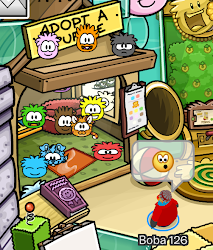
...if you have done this correctly, you should now be in the Pet Shop. Once you're in the Pet Shop, click on the "Adopt a Puffle" section which looks like this...

Club Penguin - Puffle Party 2014 Guide

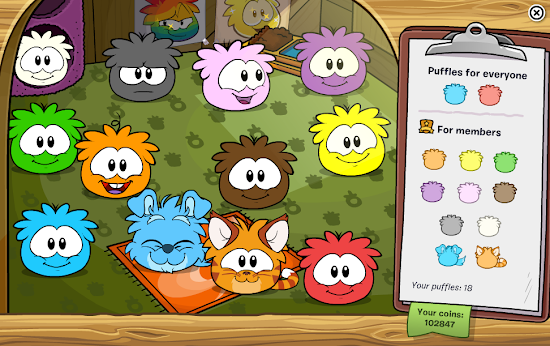
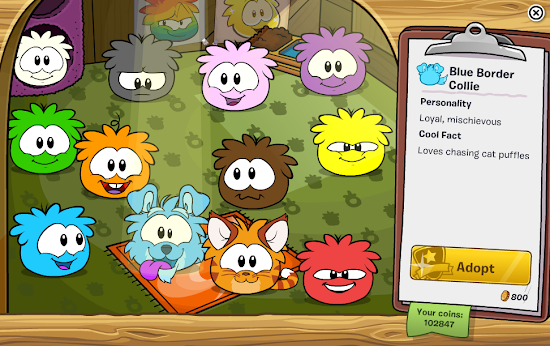
...if you have done this correctly, this should appear on your screen...

Club Penguin - Puffle Party 2014 Guide

...let's click on the Blue Border Collie Puffle first. If you do this, some information about the Blue Border Collie Puffle should appear on the right of your screen...

Club Penguin - Puffle Party 2014 Guide
Blue Border Collie

Personality

Loyal, mischevious

Cool Fact

Loves chasing cat puffles
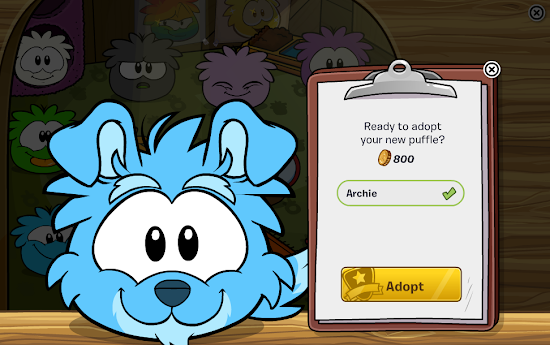
...once you've taken a look at this information, click on the "Adopt" button. If you have done this correctly, this should appear on your screen...

Club Penguin - Puffle Party 2014 Guide

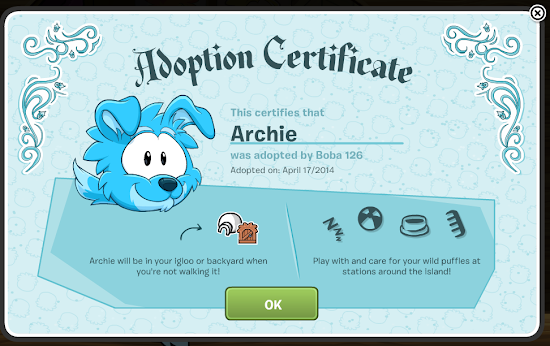
...the next step is to give your puffle a new name, I'll call mine "Archie" but you can call your's whatever you want! Get 800 coins and click on the "Adopt" button to adopt the Blue Border Collie Puffle. If you have done this correctly, the Adoption Certificate should appear on your screen...

Club Penguin - Puffle Party 2014 Guide

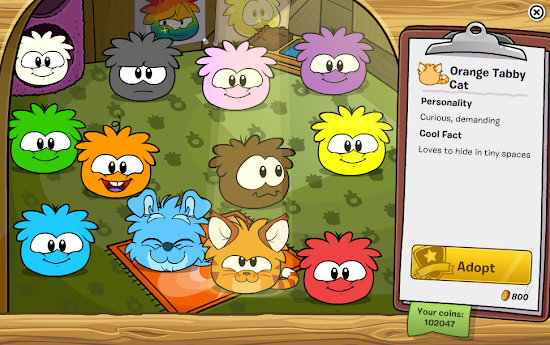
...click on "OK" to have some fun and care for your new Blue Border Collie Puffle. Let's move onto adopt the Orange Tabby Cat Puffle. If we click on the Orange Tabby Cat Puffle, we'll be able to learn more about it like this...

Club Penguin - Puffle Party 2014 Guide
Orange Tabby Cat

Personality

Curious, demanding

Cool Fact

Loves to hide in tiny spaces
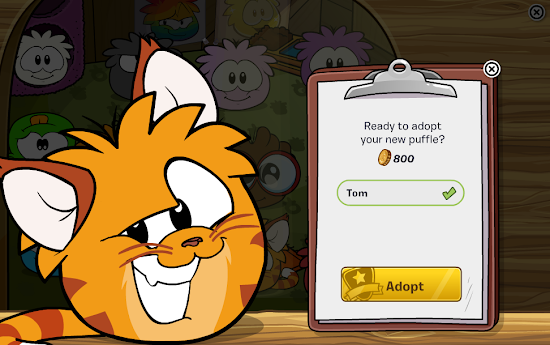
...next, let's click on the "Adopt" button and this will appear on your screen...

Club Penguin - Puffle Party 2014 Guide

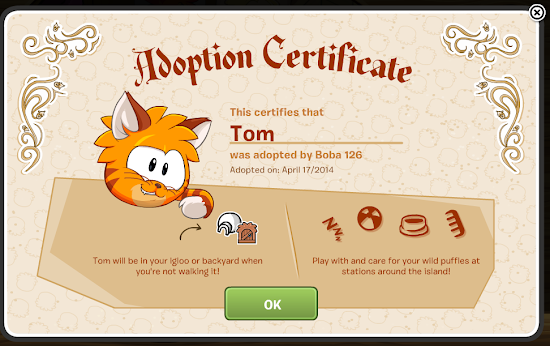
...the next step is to name your Orange Tabby Cat Puffle, I'm going to call mine "Tom" but you can name your's whatever you want! Once you've got 800 coins, click on the "Adopt" button. Once you've done this, the Adoption Certificate for your Orange Tabby Cat Puffle will appear on your screen...

Club Penguin - Puffle Party 2014 Guide

...so that's the end of my guide of the Puffle Party 2014 in Club Penguin! Make sure to return back to Boba And Jango CP for when I post my guide for the next party in Club Penguin and the next and so on.

My View
I'm absolutely loving the Puffle Party 2014! There's a lot to do, so I'm pretty sure you won't get bored at this party! I also love that not all the features at this year's Puffle Party is for just members, like this year, non-members can transform into their pet puffles and receive free puffle party items! In my opinion, this has to be the best Puffle Party in Club Penguin, and maybe even one of the best parties in the history of Club Penguin!

Your Say
Now it's time for your say! What do you think of the Puffle Party 2014 in Club Penguin? What do you like most about the Puffle Party 2014 in Club Penguin? Are you enjoying the Puffle Party 2014 in Club Penguin? Select your reaction of this post below and share us your thoughts by leaving a comment below.
~Boba 126

Remember to return to http://www.bobaandjangocp.com for the latest Club Penguin Cheats, Club Penguin Guides, Club Penguin Updates and Club Penguin Codes!

Wednesday, 16 April 2014

Club Penguin - Furniture and Igloo Catalog Cheats - April 2014

Club Penguin releases the April 2014 edition of the Furniture and Igloo Catalog
Hello penguins! Recently, Club Penguin have released the April 2014 edition of the Furniture and Igloo Catalog. Let's have a look at the cheats for the April 2014 edition of the Furniture and Igloo Catalog...

Club Penguin - Furniture and Igloo Catalog Cheats - April 2014
Firstly, here's what the front cover of the April 2014 edition of the Furniture Catalog looks like...

Club Penguin - Furniture and Igloo Catalog Cheats - April 2014

Let's have a look at the first page of the April 2014 edition of the Furniture and Igloo Catalog, which features a puffle-tastic igloo...

Club Penguin - Furniture and Igloo Catalog Cheats - April 2014
Members can buy the Puffle Tree House Igloo to be featured on the igloo list.

Active from April 17 to April 19.
...members can buy the Puffle Tree House igloo for 1500 coins...

...next, we have two igloo which have been featured in the "April Igloos" section, let's take a look at them...

Club Penguin - Furniture and Igloo Catalog Cheats - April 2014
Wildlife Den

Create the perfect natural habitat with this secluded den.

Theatre Igloo

For putting on perfectly professional play performances!
...members can buy the Wildlife Den igloo for 900 coins and the Theatre Igloo for 4600 coins. Let's take a look at the furniture items for April 2014...

Club Penguin - Furniture and Igloo Catalog Cheats - April 2014

...members can buy the Puffle Tube Box for 300 coins, the Corner Puffle Tube for 50 coins, the 4-Way Puffle Tube for 75 coins, the Puffle Tube Bend for 2 coins and the T-Joint Puffle Tube for 60 coins...

Club Penguin - Furniture and Igloo Catalog Cheats - April 2014

...members can buy the Puffle Tube Tower for 300 coins, the Short Solid Tube for 30 coins, Long Window Tube for 55 coins and the Short Window Tube for 30 coins...

Club Penguin - Furniture and Igloo Catalog Cheats - April 2014

...members can buy the Puffle Bubble Tube for 50 coins, the Long Solid Tube for 55 coins, the Short Puffle Tube for 25 coins, the Long Puffle Tube for 50 coins and the Giant Puffle Hub for 500 coins...

Club Penguin - Furniture and Igloo Catalog Cheats - April 2014

...members can buy the Grumpy Lantern for 175 coins, the Cheeky Lantern for 175 coins, the Laughing Lantern for 175 coins, the Happy Lantern for 175 coins, the Fuzzy Green Couch for 500 coins and the Fuzzy Purple Couch for 500 coins...

Club Penguin - Furniture and Igloo Catalog Cheats - April 2014

...members can buy the Snake Grass for 140 coins, the Hippopotamus for 400 coins, the Giraffe for 450 coins and the Zebra for 400 coins...

Club Penguin - Furniture and Igloo Catalog Cheats - April 2014

...members can buy the Acacia Tree for 350 coins, the Jungle Bloom for 175 coins, the Large House Plant for 200 coins, the Jungle Flora for 150 coins and the Jungle Fern for 150 coins...

...next, we have some igloos which members can buy...

Club Penguin - Furniture and Igloo Catalog Cheats - April 2014
Snowy Backyard Igloo

The best igloo for throwing parties!

Deluxe Snow Igloo

Need a bigger igloo? Want more space? Throw larger parties? Upgrade your igloo today!
...members can buy the Snow Backyard Igloo for 3000 coins and the Deluxe Snow Igloo for 3000 coins. Next, we have some igloo flooring which members can buy for their igloos...

Club Penguin - Furniture and Igloo Catalog Cheats - April 2014

...members can buy the Dark Stone Tile for 800 coins, the Burgundy Carpet for 530 coins, the Woven Rice Mat for 750 coins, the Maple Hardwood for 620 coins, the Black Carpet for 530 coins, the Sunny Sky Floor for 530 coins, the Blue Turf for 530 coins and the Dance Floor for 1000 coins. There is also a hidden item on this page, which members can buy by clicking on the middle of the pages and clicking on the Sunny Sky Floor...

Club Penguin - Furniture and Igloo Catalog Cheats - April 2014

...members can buy the Puffle Stage for 300 coins...

Club Penguin - Furniture and Igloo Catalog Cheats - April 2014

...members can buy the Terracotta Tile for 680 coins...

...let's move onto Igloo Locations, which only members can buy for their igloos...

Club Penguin - Furniture and Igloo Catalog Cheats - April 2014
Mountain
Picture your new home on this breathtaking cliff.
...members can buy the Mountain Background for 2800 coins...

Club Penguin - Furniture and Igloo Catalog Cheats - April 2014
Beach
Soak up the sun on your beach property!
...members can buy the Beach Background for 2800 coins...

Club Penguin - Furniture and Igloo Catalog Cheats - April 2014
Forest
Find your perfect home, deep in the wilderness.
...members can buy the Forest Background for 2800 coins...

My View
I love this month's edition of the Furniture and Igloo Catalog, as it has so many items in it which can help me to make celebrate my pet puffles! My favourite items in this month's Furniture and Igloo Catalog is the Puffle Tubes, as this will be fun for my puffles to explore! I also like the Puffle Tree House Igloo as well as it's very puffle-tastic!

Your Say
Now it's time for your say! What do you think of the April 2014 edition of the Furniture Catalog? Which item is your favorite from the April 2014 edition of the Furniture Catalog? Select your reaction of this post below and share us your thoughts by leaving a comment below.
~Boba 126

Remember to return to http://www.bobaandjangocp.com for the latest Club Penguin Cheats, Club Penguin Guides, Club Penguin Updates and Club Penguin Codes!